「オールデータDL」を販売しているイベントの場合、以下の手順で「オールデータDL」を注文いただけます。
後から写真が追加された場合でも、追加分も含めてすべてがダウンロードが可能です。
※オールデータ以外の商品(単品データ・ブックなど)は注文後の写真の追加・変更・交換・キャンセルは不可となりますため、すべての写真が出そろってからの注文をご検討願います。
※後から追加で注文いただきますと、その都度配送手数料がかかりますのであらかじめご了承ください。
>オールデータDL注文時、アスリートビブス(ナンバーカード)が一致するが含まれていない写真がある場合
For events where "All Data Download" is available, you can place an order by following the steps below.
Even if additional photos are uploaded later, you will be able to download all of them, including the newly added photos.
[ Important Notes ]
-
For products other than "All Data Download" (e.g., individual digital files, photo books, etc.):
Additions, changes, exchanges, or cancellations cannot be made once an order has been placed. We kindly ask that you wait until all photos have been released before placing your order.
-
Regarding additional orders:
Please note that if you place separate orders at a later time, a shipping fee will apply to each individual transaction.
[Click here to オールデータDL注文時、アスリートビブス(ナンバーカード)が一致するが含まれていない写真がある場合(If photos matching your Athlete Bib (Number Card) are missing when ordering "All Data Download")>]
1.アスリートビブス(ナンバーカード)番号を入力する。
「アスリートビブス(ナンバーカード)検索」ができるイベントの場合、閲覧パスワードを入力した後のイベントページに以下の検索窓が表示されます。
ご自身の番号を入力して、検索するボタンを押してください。
※番号が隠れている場合や番号を読み取れない写真は表示されません。
※イベントによっては、番号以外の情報の入力が必要な場合もございます。
2.「検索する」ボタンを押す。
3.検索結果(写真)が表示されたら、「オールデータDL」ボタンを押す。
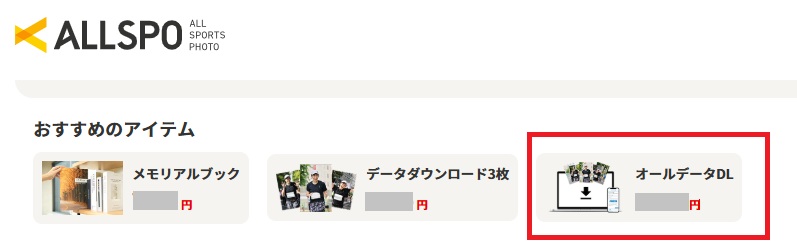 4.「カートに入れる」ボタンを押す。
※お得なセット商品に変更する場合は、変更したい商品のボタンを押して、手順に沿って操作ください。
※不要なお写真はマイページの「データアルバム」にて削除可能ですので、以下「データアルバムについて知りたい」よりご確認ください
>データアルバムについて知りたい
1. Enter your bib number.
For events where "Athlete Bib (Number Card) Search" is available, the search box below will appear on the event page after you enter your viewing password.
Please enter your number and click the "Search" button.
[ Please Note ]
*Photos where the number is hidden or unreadable will not be displayed in the search results.
*Depending on the event, you may be required to enter information other than your number.
2. Click the "Search" button.
3. Once the search results (photos) appear, click the "All Data Download" button.
4. Click the "Add to Cart" button.
*To switch to a Value Set, click the button for the item you wish to change to and follow the instructions. (Please note that Value Sets may not be available for all events.)
*Unwanted photos can be deleted from the "Data Album" on My Page. For details, please see "About Data Album" below.
[Click here toデータアルバムについて知りたい場合(About "Data Album")>]